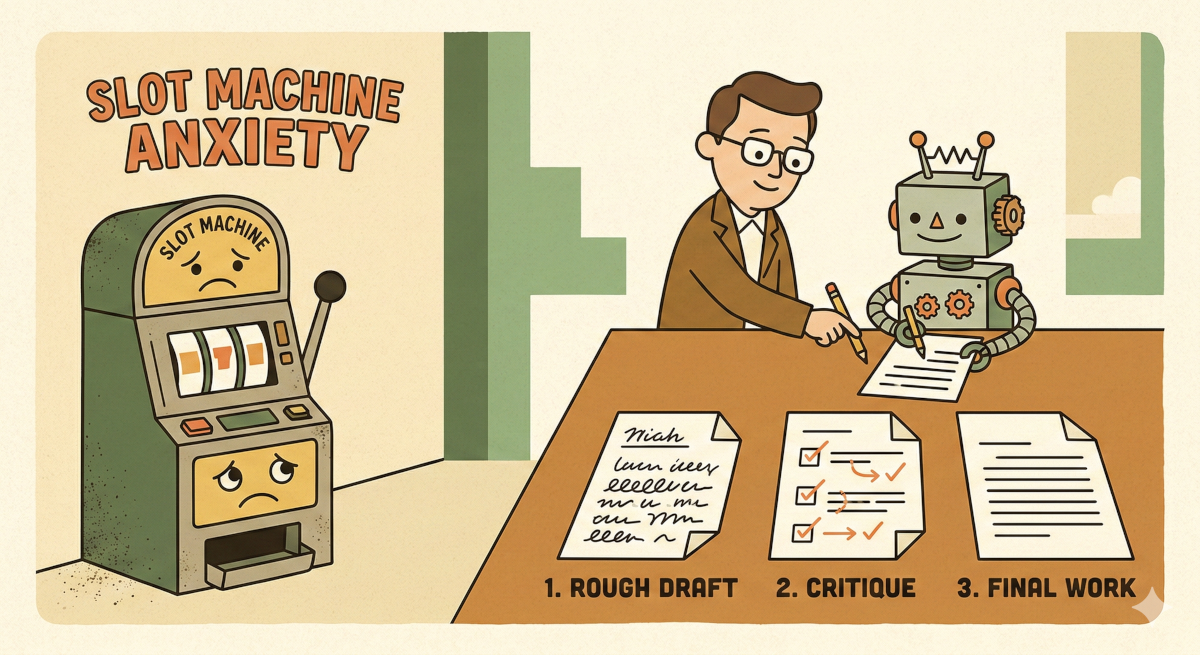
I used to treat the “Generate” button like a slot machine handle.
I had custom GPTs and well-crafted promtps setup, I would hit Enter, and cross my fingers. If the result was bad, I’d tweak a single word and pull the handle again. If it was good, I felt like I’d hit the jackpot.
For a long time, I just assumed this was how the game was played. If the output was mediocre, I blamed myself. I thought I just hadn’t found the “magic words” yet.
But recently, I realized I was looking at it all wrong. I was treating these tools differently than I would ever treat a human. I was expecting perfection from a single instruction, with zero supervision, zero drafts, and severely limited context.
If I managed a human like that, they’d quit by lunch.
So, I stopped trying to write the perfect prompt. Instead, I tried managing the AI like a junior employee. I introduced a “Performance Review” loop—a workflow change that forces the AI to critique its own work before I ever see it.
The result? The slot machine anxiety is mostly gone. Here is what I built, and why I think it works better than brute-force prompting.
The “Intern” Problem
To understand why this helps, I had to wrap my head around how Large Language Models (LLMs) actually work.
When you send a standard, one-shot prompt to an AI, you are essentially doing this:
You walk up to a nervous junior intern. You hand them a complex assignment. You tell them: “Start typing the final report immediately. You cannot look up facts. You cannot write a rough draft. You cannot read what you just wrote to check for errors. And you cannot use the backspace key. Go.”
It sounds insane when you frame it that way. But that is exactly what a standard chat interface does. It generates text token by token, predicting the next word based on the previous ones. It isn’t “thinking” about the end of the sentence before it starts the beginning. It literally cannot backspace.
I’ve been reading about “Agentic Workflows”—people like Andrew Ng talk about this a lot—and the research suggests that “zero-shot” performance (asking for the answer in one go) has a hard ceiling. No matter how smart the model gets, if it doesn’t have the space to iterate, it makes mistakes.
We iterate. We draft. We edit.
I figured I should let the AI do the same.
The Experiment
I decided to move from “prompting” to what people are calling “flow engineering.” I didn’t write any complex code for this; I just chained a few steps together in a chat window to see what would happen.
Here is the loop I tried:
1. The Doer (The Draft)
I gave it a standard instruction. In my case, I asked for a technical explanation of a Python concept.
- Role: Content Writer.
- Task: Write the draft.
2. The Critic (The Review)
This was the weird part. I took the output from step one and fed it back into the model.
- Instruction: “You are a Senior Technical Editor. Review the draft below. Critique it for logical flow and factual accuracy. Be harsh. List specific improvements.”
3. The Editor (The Polish)
Finally, I asked the model to implement its own feedback.
- Instruction: “Rewrite the original draft, incorporating the changes suggested in the review.”
By separating the creation from the evaluation, I forced the AI to switch contexts. In step one, it’s trying to be creative. In step two, it’s trying to be analytical. When I tried to do both in one prompt, the quality was usually a mess. When I split them up, things got interesting.
What the AI Caught
The first time I ran this loop, I was actually surprised.
I had asked for a breakdown of a specific API integration. The first draft produced a confident, smooth-sounding explanation. To my eyes, it looked fine.
Then, the “Critic” kicked in. It flagged a major issue: “The draft references a parameter that is deprecated in the latest version of the library.”
I looked it up. The AI was right. The draft was wrong.
Then the “Editor” rewrote the piece, fixing the parameter.
Here is what confused me: The model knew the draft was flawed. It had the knowledge in its training data that the parameter was deprecated.
But because of how LLMs generate text linearly (that “no backspace” rule), once it had started down the wrong path in step one, it committed to it. It couldn’t stop and say, “Wait, let me fix that.” It just kept generating to maintain the flow.
By forcing a pause and a review, I unlocked the intelligence that was already there but couldn’t be accessed in a single turn.
The Trade-off
I know what you’re thinking. “Nouman, doesn’t this take three times as long? And cost three times as many tokens?”
Yes. It absolutely does.
If you are using AI to generate lists of cat names, this is overkill. But in my actual work, the bottleneck isn’t the 30 seconds the AI takes to generate text; the bottleneck is the 20 minutes I spend fact-checking and editing a mediocre draft.
I am happily trading compute time for my own time.
Moving toward “Agentic”
This experiment taught me that the role of “Prompt Engineer”—someone who whispers magic words to a chatbot—is probably going away.
We are moving toward something else. Maybe “Agent Architect”? I don’t know, the titles are all made up anyway. But the industry seems to be shifting from static automation to these dynamic loops.
Tools like Claude Code or GitHub Copilot are already doing this in the background—planning, trying, failing, and retrying.
It’s less about being a wizard and more about being a manager.
Next time you have a complex task for your AI, try not asking for the answer immediately. Ask it to draft an answer, then ask it to critique that draft, and then ask for the final version.
Give your AI a performance review. It turns out, it actually responds pretty well to feedback.