
I am not a frontend engineer. I don’t know how to configure Webpack or write complex regex parsers from scratch. But I needed a tool to fix broken WordPress Block markup that was costing my team hours of manual work.
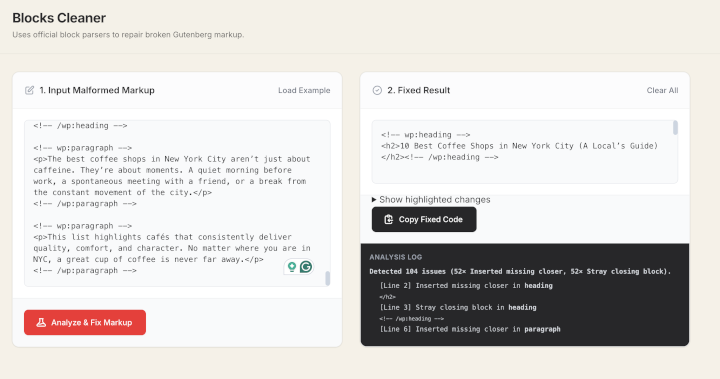
This week, using Cursor (Claude Sonnet), I built and deployed a containerized web app that parses and repairs Gutenberg block syntax instantly.
The Problem
I frequently deal with “broken” block comments in my content workflows. A missing / or malformed JSON attribute in a comment like “ breaks the visual editor. Manually finding these in 5,000-word articles is a nightmare.
The Stack
Instead of a heavy backend, I realized this could run entirely in the browser using the official WordPress parsers.
- Frontend: HTML5 + Tailwind CSS (for the UI).
- Logic: Vanilla JavaScript + bundled
@wordpress/block-serialization-spec-parser. - Server: Nginx (Alpine Linux) serving static assets.
- Deployment: Docker + Traefik (for SSL/Routing).
The Workflow: “Orchestrating” the Code
I didn’t write the regex or the parser logic line-by-line. I acted as the Architect:
- The Parser: I asked AI to “Extract the official WordPress block parser functions and bundle them for browser usage.”
- The Logic: I described the repair rules: “Find block comments where the JSON attributes are malformed or where the closing tag is missing, and auto-close them based on the stack.”
The Code
Here is the core logic the AI generated to detect and fix the block comments using a stack-based approach:
// The AI implemented a stack to track open blocks and detect mismatches
function autoFixBlockComments(raw) {
    const stack = [];
    // Regex to find WP Block comments
    const RE_ANY = //gi;

    raw.replace(RE_ANY, (match, isSlash, sep, name, attrs, isSelf, idx) => {
        const cleanName = String(name).toLowerCase();

        if (isSlash) {
            // Found a closing tag // Logic: Check if it matches the top of the stack.
            // If not, we found a "Stray closing block" or "Auto-closed mismatch"
        } else if (!isSelf) {
            // Found an opening tag. Push to stack.
            stack.push({ name: cleanName, where: idx });
        }
    });
}
The Deployment (Docker)
To make this available globally, I wrapped it in a lightweight Docker container. I didn’t need to look up Nginx config syntax; I just prompted: “Create a multi-stage Dockerfile that serves these static files using Nginx Alpine.”
Dockerfile
FROM nginx:alpine
# Remove default nginx static assets
RUN rm -rf /usr/share/nginx/html/*
# Copy our static assets
COPY index.html /usr/share/nginx/html/
COPY bundle.js /usr/share/nginx/html/
EXPOSE 80
CMD ["nginx", "-g", "daemon off;"]
The Result
The tool is now live as a public utility. It accepts broken markup, visualizes the errors, and returns clean HTML in milliseconds.
Live Demo: Blocks Cleaner
Total build time: 1 evening.
This project confirmed that you don’t need to be a full-stack dev to ship full-stack value. You just need to be a Systems Architect who can clearly define the problem and orchestrate the AI to build the solution.